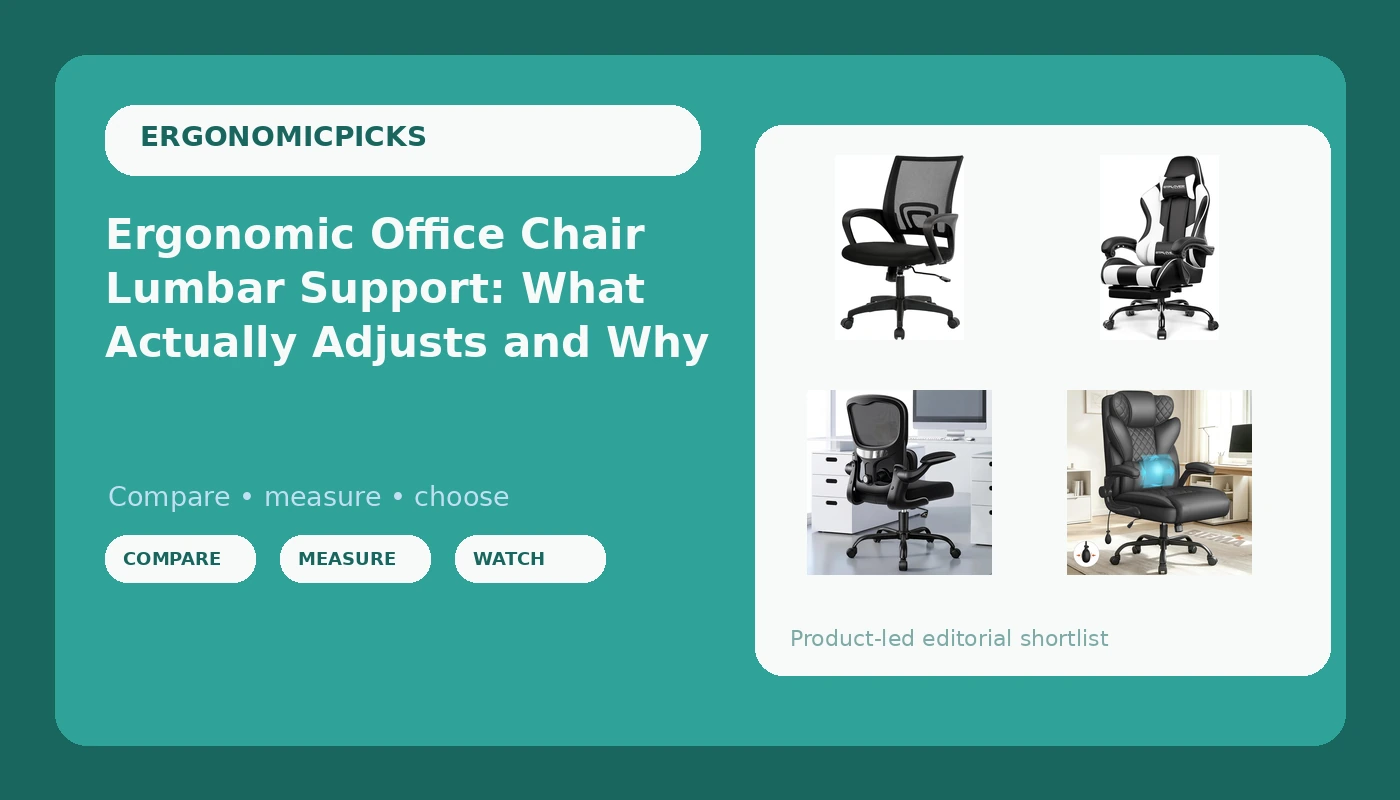
Ergonomic office chair lumbar support is the line shoppers read first and understand least. On a chair that works, it is a mechanism you can move to meet the inward curve of your lower back, and it holds that position after six hours of sitting. On a chair that does not, it is a foam pad sewn into the backrest at a height chosen for a person who is not you. Nothing about the word "ergonomic" is regulated, so the label itself tells you almost nothing. What tells you something is the list of adjustments, the seat depth, and whether the parts that touch your body can be repositioned without tools. The four chairs below sit in different corners of that question, and none of them is right for every body.
Related: Office Chair Seat Depth: How to Measure Yours Before You Buy →
Quick answer
Lumbar support does its job only when it can be moved to meet your lower back and then stays there under load. Of the four chairs here, the ALLGOD mesh chair lists an adjustable lumbar support and flip-up armrests, the high-back chair lists an inflatable lumbar support, the GTPLAYER gaming chair lists lumbar support along with a footrest and headrest, and the mid-back swivel chair is the smallest and simplest of the group. None of these is the best chair in any absolute sense. The right one depends on your torso length, your seat depth, and how many hours a day you sit without standing up.
Four useful options
| Model | Best fit | What stands out |
|---|---|---|
| ALLGOD Ergonomic Office Chair, mesh with flip-up armrests | Full workdays at a desk where the chair needs to tuck away | Mesh back, adjustable lumbar support, flip-up armrests, 300 lb weight capacity listed |
| Ergonomic Office Chair with Inflatable Lumbar Support, high back, black | People who want to tune lumbar firmness rather than height | Inflatable lumbar support and a high back |
| GTPLAYER Gaming Chair, Pearl White | Reclining and footrest use during long sessions | Footrest, headrest, lumbar support, height adjustment, 360 degree swivel seat |
| Ergonomic Office Chair, Mid-Back Swivel Desk Chair, dark black | Compact desks and shorter sitting sessions | Mid-back profile on a swivel base |
The adjustable-lumbar mesh pick: ALLGOD Ergonomic Office Chair
Flip-up armrests are the feature people underrate. If your armrests cannot fold up or drop down, the chair stops roughly four inches short of your desk and you spend the day reaching forward for your keyboard, which is how shoulders end up rounded and sore. The trade-off to understand here is that "adjustable lumbar support" is a phrase that covers several different mechanisms. Some move up and down on a track. Some move in and out on a dial. Some do both. The listing tells you the feature exists, not which kind it is, so look at the mechanism in the photos before you commit. Mesh tension is the other unknown. A mesh back distributes pressure well when the weave is tight, and sags into a hammock when it is not.
The high-back option: Ergonomic Office Chair with Inflatable Lumbar Support
An inflatable lumbar bladder is a genuinely different approach from a sliding pad. With a pad, you change where the pressure sits. With a bladder, you change how much pressure there is, which is useful if your lower back is sensitive on some days and fine on others. The catch is that inflatables ask something of you. You have to pump it, test it, and adjust it again after a couple of hours, because a bladder that was comfortable at 9 AM can feel like a fist at 3 PM. A high back also changes how the chair fits. Taller backrests support more of the thoracic spine, which helps if you tend to slump, but they can push the head forward if the curve does not line up with your own. Sit in it before you decide.
The reclining option: GTPLAYER Gaming Chair, Pearl White
Gaming chairs get dismissed in ergonomics circles, and sometimes that is fair. A deep bucket seat with high side bolsters can fight your shoulders when you sit upright for keyboard work, because the wings push your arms forward. But the reclining design has a real use case: if you take calls, read, or watch something with your feet up, a footrest and a headrest let you shift load off your lower back instead of holding one position for hours. The honest trade-off is that this chair is at its best when you are leaning back, and most paid work happens leaning forward. If you want a chair for a nine-hour desk day, the mesh and high-back options above are built for that posture. If you want one chair for both, this is the compromise, and it is a compromise in both directions.
The compact option: Ergonomic Office Chair, Mid-Back Swivel Desk Chair
A mid-back chair stops below the shoulder blades, which gives your upper back more freedom to move and keeps the chair from crowding your arms. For a short sitting session, a secondary desk, or a small room where a high back would dominate the space, that is an advantage. For a full workday, it means less contact area and less support behind the shoulders, so the chair has to earn its keep with seat and lumbar geometry instead. The listing here does not describe an adjustable lumbar mechanism or adjustable armrests, so treat it as what it is: a straightforward swivel desk chair rather than a chair built around a fit system. If you sit six hours a day, this is the one I would think hardest about before choosing.
Prices and availability may change. Product images, names, and retailer links are matched to verified listings. No current price, rating, stock status, or measured result is stated here without current evidence.
What adjustable lumbar support actually means
There are three ways a chair can support your lumbar curve, and they are not equal. The first is a fixed pad. It sits at one height and one depth, and it either matches your back or it does not. The second is a pad that slides up and down on a track. This helps, but only if the track has enough range for your torso, and only if the pad locks. The third is a mechanism that changes both height and depth, so the support can be pushed into your back rather than just parked behind it. That is the one worth paying for.
Here is the test that separates marketing from function. Set the support where it feels right, then sit for two hours and check again. If you are re-adjusting it, or if you have unconsciously slid forward to escape it, the mechanism is not holding. A pressure map makes this visible: it shows where your weight actually lands, and a lumbar support that looks generous in a photo often shows up as two hot spots at the base of the ribs with nothing under the curve itself. Inflatable designs change firmness rather than position, which is a different tool for a different problem.
Seat depth, tilt tension, and armrest geometry
Seat depth is the spec that causes the most fit problems and gets the least attention. Too long, and the front edge presses behind your knees, which pushes you forward and flattens your lumbar curve. Too short, and your thighs carry weight they should not have to carry. The check is simple: sit all the way back, and you should be able to fit two or three fingers between the back of your knee and the edge of the seat.
Tilt tension is the resistance you feel when you lean back. Loose tension turns the chair into a recliner and encourages slouching. Locked tension keeps you rigid and stiff. The useful setting is in between, where the chair moves with you and stops where you stop.
Armrests are not a luxury. Floating elbows are one of the most common sources of shoulder and neck pain I see, because the muscles that hold the arm up work all day. Armrests should meet your forearms at roughly desk height with your shoulders relaxed, and they should not wobble when you lean on them. Flip-up armrests solve a different problem, which is getting the chair close enough to the desk that you are not reaching.
- Measure your seat depth before anything else. Sit back against the backrest and check the gap behind your knees.
- Decide whether you need to change lumbar height or lumbar firmness. Height calls for a sliding or tracked mechanism; firmness calls for an inflatable one.
- Check how the armrests adjust. Height adjustment matters more than flip-up function for typing posture; flip-up matters for tucking the chair away.
- Be honest about your posture. If you lean back and put your feet up, a reclining chair with a footrest fits. If you sit square to a keyboard, it does not.
- Plan on a five-year horizon. A chair is a long purchase, and the one that fails in eighteen months was never the cheap option.
Practical guidance before you buy
- Set tilt tension to the middle of its range first, then adjust. Most people never touch the knob and then blame the chair for their posture.
- Give a new chair a full work week before judging it. Fit problems show up on day four, not in the first ten minutes.
- If you buy a mesh back, check the weave tension in the reviews that mention sagging, because mesh that stretches turns into a hammock for your tailbone.
- Keep your feet flat and your hips slightly above your knees. If the chair will not go low enough, a footrest is cheaper than a new chair.
- Write down the two adjustments you actually use. If you only ever touch seat height, you are paying for mechanisms you do not need.
Which option should you choose?
Choose the ALLGOD Ergonomic Office Chair when you want adjustable lumbar support plus armrests that fold up so the chair tucks under the desk, and you prefer a mesh back. Choose the Ergonomic Office Chair with Inflatable Lumbar Support when you want to tune how firm the lumbar pressure feels rather than only where it sits, and a high back suits your posture. Choose the GTPLAYER Gaming Chair when you recline, take calls with your feet up, and want a footrest and headrest in one chair. Choose the Ergonomic Office Chair, Mid-Back Swivel Desk Chair when you have a compact space, sit in shorter stretches, and want a simple swivel chair without a mechanism stack.
The limitation worth stating plainly: the product listings describe features, not fit. None of the four listings tells you the lumbar travel range, the seat depth in inches, or the armrest height range, and those are the numbers that decide whether a chair works for your body. Buy from a seller with a return window, and use it.
The bottom line
Lumbar support is not a checkbox. It is a mechanism that either moves to meet your lower back and stays there, or does not, and the price tag tells you very little about which one you are getting. The four chairs here cover four different jobs: a mesh chair with adjustable lumbar and flip-up armrests, a high-back with an inflatable lumbar pad, a recliner with a footrest and headrest, and a compact mid-back swivel. Match the chair to how you actually sit, measure your seat depth, and give yourself a return window in case the fit is wrong. Then spend the first week adjusting it, because a chair that is never adjusted is just furniture.