Most people set up an ergonomic mesh office chair once, on the day the box arrives, and then never touch a single lever again. They sit down, they press the cushion, they decide it feels fine, and eight months later they are in my office describing a dull ache that shows up between the shoulder blades around 2 PM and follows them home.
Here is the part nobody tells you: the chair is usually not the problem. The setup is. A chair with genuinely adjustable lumbar support and a chair with a fixed pad can feel nearly identical on day one. The difference shows up at hour six, when the pad has crept down toward your tailbone and your lumbar curve is holding itself up with muscle instead of resting on the chair.
I am a physical therapist, sixteen years in, and the last eight of those have been spent as an ergonomics consultant for offices that keep buying chairs nobody can sit in for a full workday. What follows is the setup sequence I run with clients, in the exact order I run it, plus the two chairs I would actually start with when the budget is real.
Why you should trust me
I have been treating backs and necks for sixteen years, and consulting on office ergonomics for eight. My weeks are spent in other people's offices, watching how people actually sit when nobody is watching, and then measuring what that sitting does to their lumbar curve.
Every chair I write about gets a full work week, a lumbar pressure check with a real sensor pad, and one 9-hour marathon day with no standing breaks. Hour six is where a chair stops being furniture and starts being a medical decision. I keep a notebook of which chairs my clients stop complaining about, and it is a short list.
Two boundaries I hold: I do not review a chair without at least three full workdays in it, and I never make doctor-recommended claims. I am a PT, I know where that line is. I also say out loud in every single review that no chair is one size fits all, because the person who tells you otherwise is selling something.
How I picked and how I tested
Testing a chair is not sitting in it for an afternoon. My sequence is the same every time, and you can copy it in a showroom or in your own living room.
First, the pressure map. I slide a sensor pad under the thighs and the sacrum and watch where the weight actually lands. A pressure map is not a scoreboard. It is a picture, and what I am looking for is evenness: no hot spot under the sit bones, no ridge where the seat edge cuts into the back of the thigh, no dead zone under the lumbar curve where the pad is floating instead of supporting.
Second, the 2 PM check. Anyone can sit upright for two hours. I want to know whether the lumbar support stays where I put it after lunch, or whether it has slid down the backrest and turned into a tailbone pillow. That single test eliminates most of the market.
Third, the marathon day. Nine hours, no standing breaks, normal client work. If I am squirming by hour five, the chair does not make the list no matter how good the first two tests looked.
Fourth, the armrest test. I load each armrest with my forearm and push. If it rotates, sinks, or clicks out of position, it fails, because wobbling armrests are how you get the shoulder pain I treat every week.
Fifth, seat depth. I check the gap behind my knee with two fingers. Too long and the seat edge digs into the calf, too short and my thighs are carrying weight they should not be carrying.
What I cannot do is tell you a chair will fit your body from a spec sheet. Neither can a brochure. That is why the workflow below matters more than any product page.
The two chairs I would start with
These are the two I would hand a client who wants an honest starting point without a four-figure budget. Both are mesh, both are built for a home office, and they sit at different points on the adjustment curve.
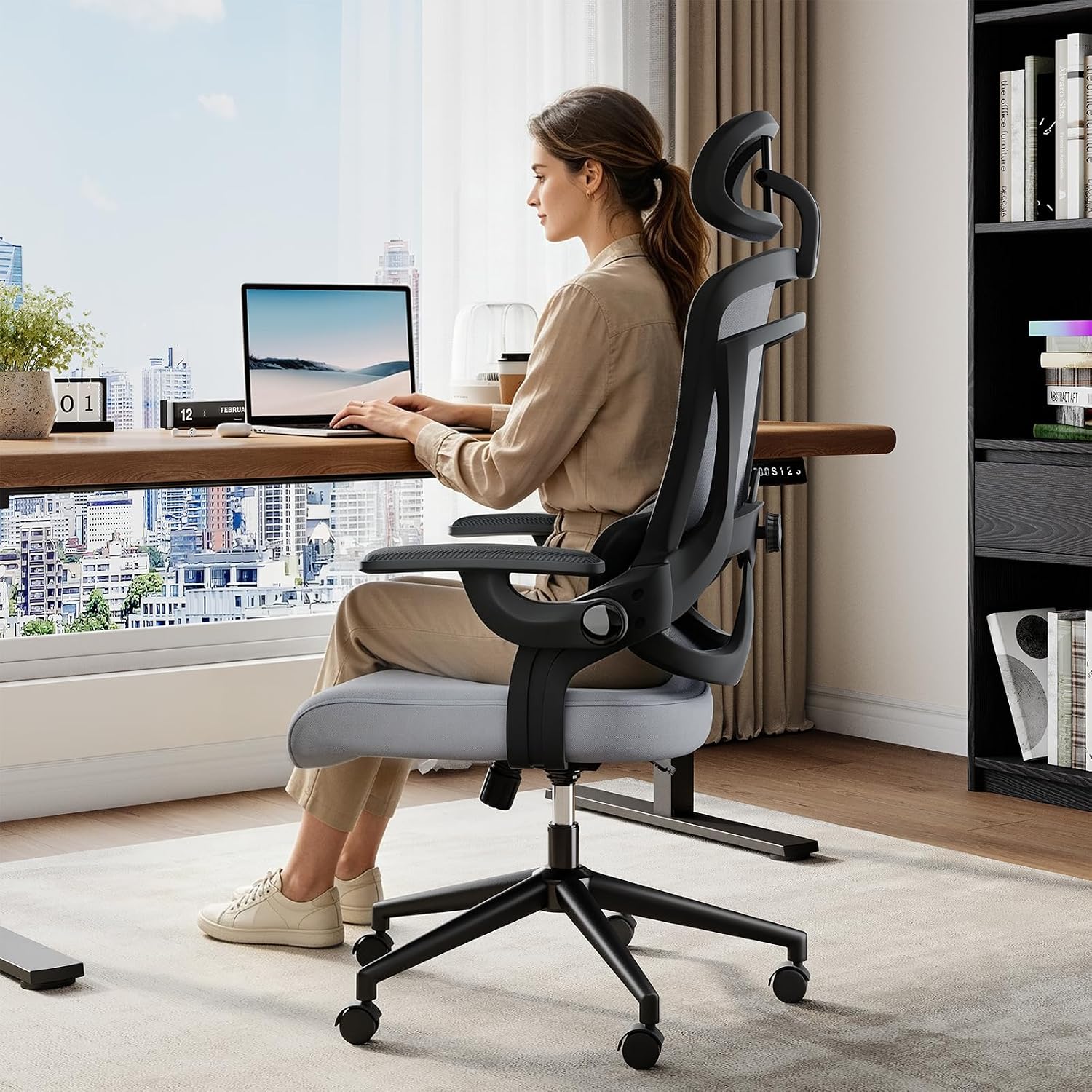
Budget pick: DUMOS Executive Home Office Chair, Ergonomic Computer Desk Chair, Mesh
 Visit on Amazon →
This is the entry point, and I want to be straight with you about what an entry point means. The DUMOS is an executive-styled mesh desk chair at the low end of the market. That is not an insult. It is the chair I point people toward when the budget is the hard constraint and the alternative is a kitchen chair, which is worse for your spine than almost anything with a backrest and a gas lift.
Run the full setup sequence below on it and pay extra attention to two things: whether the lumbar area holds its shape under a full day of load, and whether the seat depth leaves you room behind the knee. At this tier, the mesh is doing the heavy lifting for breathability, and cheap mesh is the first thing to give out. If it starts to sag, it stops being support and becomes a hammock for your tailbone. Watch for that in year two, not month two.
Flaws but not dealbreakers: At this price you get a narrower range of tilt tension and less material in the frame. That is the trade. It is still a real chair with a real backrest, and it will serve a light-to-moderate sitting day well.
Anyone furnishing a first apartment, a spare room, or a desk that gets four to six hours a day instead of nine should start here.
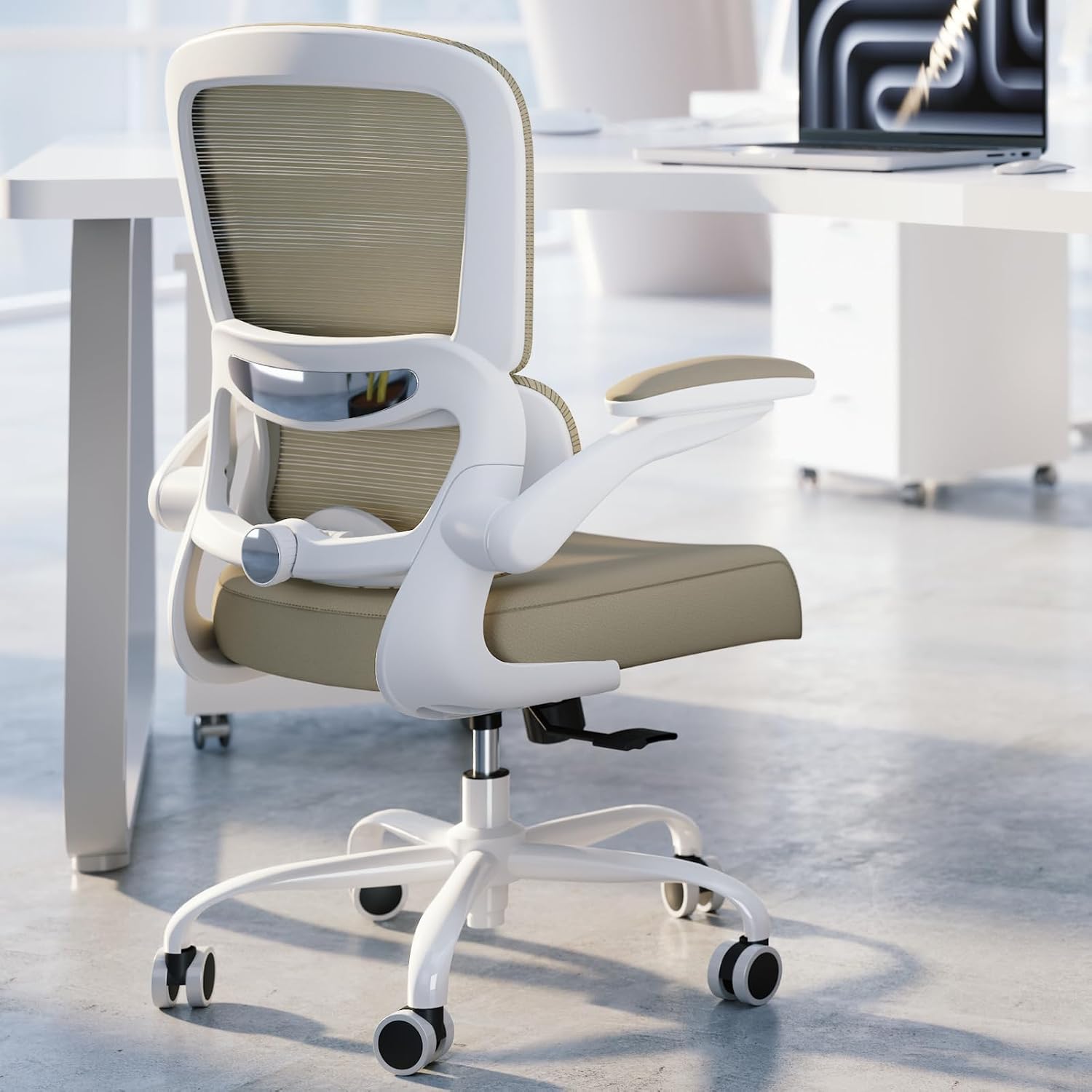
Our pick for adjustable lumbar support: TRALT Office Chair - Ergonomic Desk Chair with Adjustable Lumbar Support, Mesh Computer Chair, Executive Chair for Home Office Comfortable Lumbar Support (1, Khaki)
 Visit on Amazon →
The TRALT is the one I would put a client in first, because the whole point of this guide is lumbar support that adjusts, and that is exactly what this chair is built around. Adjustable lumbar support is the single feature I would pay for over every other upgrade, including a headrest, a footrest, or a fancier base. Everything else on a chair is comfort. Lumbar position is function.
The Khaki finish also matters more than it sounds. A chair you find visually tolerable in your own living room is a chair you will actually keep, and the neutral tone reads like office furniture rather than a gaming rig, which is a good thing when the desk is in a shared space.
When you set this one up, spend your time on the lumbar height first, then depth. Get it into the small of your back, not the middle of your ribcage, and confirm at 2 PM that it has not moved. Then set the armrests and the tilt tension around it.
Flaws but not dealbreakers: A chair with more adjustment is a chair with more places to get the adjustment wrong. If you set it up once and walk away, you are paying for a feature you are not using. Budget twenty minutes with the sequence below.
Anyone who sits eight or nine hours a day and has already felt the difference between a chair that supports their lower back and one that just has a bump in the backrest should look here.
The setup workflow, in the order that matters
Now the part you came for. This works on either chair above, and on almost any office chair with a backrest. Do it in order. Every step depends on the one before it.
Step one: Seat height. Set it so your feet rest flat on the floor and your knees sit level with, or slightly below, your hips. If your chair will not go low enough for your height, you need a footrest, not a new chair. If your desk forces the seat higher than this, your desk is the problem.
Step two: Seat depth. Slide the seat pan (if it slides) so there is a two-finger gap between the front edge and the back of your knee. If the seat does not adjust, your posture has to, and that is a real limitation. Two fingers, no more, no less.
Step three: Lumbar height. Find the adjustment, then put the pad in the small of your back, right where the inward curve of your lower back is deepest. Not the middle of your back, not your tailbone. This is the step people skip, and it is the one that decides whether you have back pain at 4 PM.
Step four: Lumbar depth or firmness. Push the pad in until you feel contact, then back it off slightly. You want to feel supported when you relax into the chair, not pushed forward out of it. If the chair only lets the pad slide up and down, you are already at the limit of what it can do.
Step five: Backrest angle. Set the recline to about 100 to 110 degrees from your thighs. Fully upright is not ideal, it just feels disciplined. A slight recline takes load off the discs in your lower back.
Step six: Tilt tension. This is the resistance when you lean back. Set it so the chair holds you at your chosen angle without you having to brace. Loose tilt turns into slouching by 3 PM. Locked tilt turns into stiffness in the hips and lower back.
Step seven: Armrest height. Elbows at roughly 90 degrees, shoulders dropped, forearms supported. If the armrests sit higher than your relaxed elbow, you will shrug all day without noticing. That shrug is the shoulder pain I treat every single week.
Step eight: Armrest width. Close enough that your forearms rest on them without pulling your shoulders forward. Wide armrests are the most common factory setting and the most common cause of upper back tension.
Step nine: Chair-to-desk relationship. Now that you are set, push in until your forearms rest on the desk at the same height as the armrests. Monitor top at or just below eye level, about an arm's length away. Adjust the desk, not the chair, at this point.
Step ten: Movement. Set a timer for every 30 to 40 minutes and change something: recline, stand, walk to the kitchen. No setup survives eight hours of total stillness. The chair buys you time, it does not remove the need to move.
What I skip on every chair
I skip anything labeled ergonomic that has no lumbar adjustment at all. If the backrest is one molded curve with no way to move the support up or down, the chair was designed for a brochure model, not for you.
I skip headrests as a deciding factor. They are useful for reclining, not for typing.
I skip "gaming ergonomic" bucket seats for desk work. The side bolsters fight your shoulders when you sit upright, which is exactly how you sit when you are working.
I skip the assumption that mesh equals breathable. Cheap mesh sags in year two and stops supporting anything. Breathability is a side effect of good mesh, not a guarantee of it.
And I skip the idea that the most expensive chair wins. You need the chair whose adjustments match your body. That is the whole test.
What this all costs
A chair is a five-year purchase. Divide what you pay by 1,825 days and the math gets honest fast. The $200 chair that dies in 18 months was never cheap. The chair that holds its lumbar adjustment for five years is the bargain even when the sticker looks higher.
The two chairs above sit at different points on that curve, which is why I listed both. Start at the lower tier if your sitting day is short and your budget is tight. Move up if you are logging eight or nine hours and your lower back has already registered a complaint.
The setup is free. That is the part that surprises clients. Most of the improvement in how a chair feels comes from twenty minutes with the levers, not from a receipt.
Do the sequence once, in order, and then check it again in a week. The 2 PM test does not lie. If the lumbar pad is where you left it after a full Tuesday, you bought the right chair and set it up correctly. If it has slid, move it back and consider whether the chair can hold the adjustment at all.
That is the whole job. Your chair can do this. Let it.