Most office chairs ship set up for a body that does not exist. The seat pan is too high, the lumbar pad is parked somewhere around your shoulder blades, and the armrests sit at a height that makes your shoulders climb toward your ears by mid-morning. You blame the chair. Usually the chair is fine and the setup is wrong.
Ergonomic office chair setup is five adjustments, a tape measure, and about 20 minutes. That is the whole job. The chair you already own is probably capable of it, and if it isn't, the two chairs below are the ones I would start with.
I'm Dana. I've been a physical therapist for 16 years and an ergonomics consultant for the last eight, which means I have spent a lot of my working life watching people sit in chairs their employer bought because they were on sale. I have measured more lumbar curves than most orthopedists ever will. My clients are office workers in Madison, Wisconsin, who come to me with neck pain, mid-back pain, or the specific lower-back ache that shows up at 2 p.m. on a Tuesday and is gone by dinner.
The pattern is almost always the same. The chair is not the villain. The setup is.
Why you should trust me
I spent eight years walking office floors with a pressure map under my arm, and I have watched what happens to a spine after hour six in a chair that looked adjustable in the brochure. I test every chair the same way: at least three full workdays, a lumbar pressure check, and one nine-hour marathon day with no standing breaks. Then I write down whether my clients stop complaining about it.
I am not a doctor and I do not play one in a product review. What I am is the person an office manager calls after the cheap chairs arrive and the complaints start. I own a refurbished task chair from 2016, so I have no stake in telling you that expensive means better. It does not. Fit means better.
How I picked and how I tested
This is a setup guide, not a ranking. But setup only works if the chair has something to adjust, so I keep a short list of chairs that pass the basic test: a seat pan that moves, a back that holds its position, and armrests that do not wobble when you lean on them.
The test is not the showroom. It is hour six. A chair can feel wonderful for 20 minutes and feel like a park bench by the end of the afternoon. So the protocol is three full workdays minimum, one pressure map pass to see where your weight actually lands, and one long day where I do not get up except for water. If the lumbar support slides down on its own, I notice it by day two. If the armrests rotate under a little downward pressure, I notice it in the first hour.
The two chairs below are the ones I would put in a real office and then adjust. One is a task chair shape, the other is a gaming chair shape, and the difference matters more than most buyers expect.
The two chairs worth setting up first
Both of these have the pieces you need for the five adjustments below. Neither is a waiting room chair, which is the category I spend most of my time warning people away from.
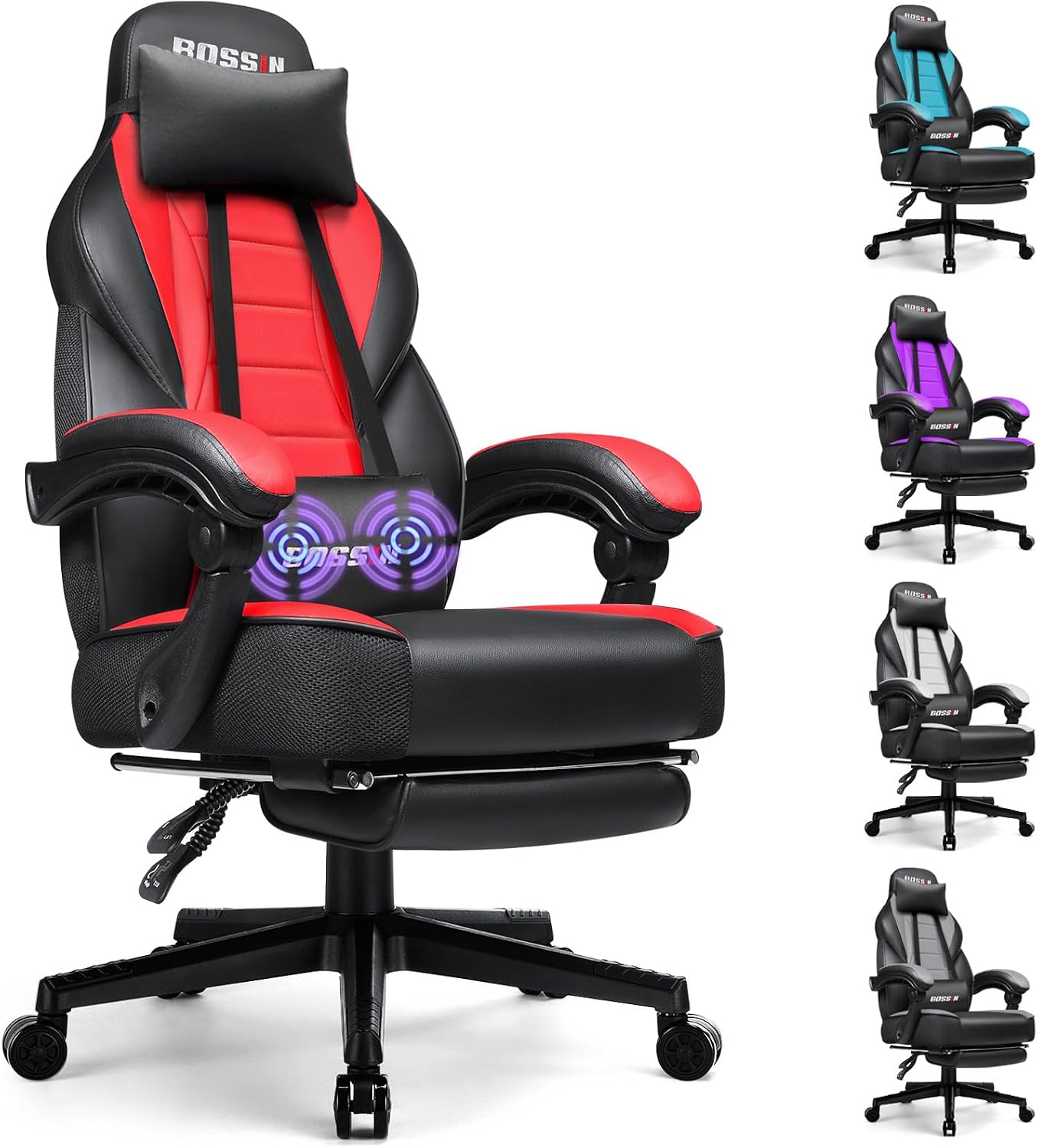
Entry pick: BOSSIN Racing Style Gaming Chair, Leather Computer Desk Chair with Footrest and Headrest, Ergonomic Heavy Duty Design, Large Size High-Back E-Sports, Big and Tall Gaming Chair
 Visit on Amazon →
I make fun of gaming chair marketing for a living, and I am recommending this one anyway, so let me be precise about why. The high back and the headrest give a tall sitter somewhere to put the top of the spine, which a lot of task chairs at this price do not. The frame is built heavy duty and sized for big and tall users, and that matters if you are over six feet, because the alternative is a chair where your shoulders hang off the backrest. The footrest is a recliner feature, not a work feature, and I would treat it that way.
The honest caveat is the bucket seat. Racing style side bolsters are shaped for a reclined driving position. Sit upright for eight hours and those bolsters push your shoulders forward, which is the exact posture I spend my week correcting. The other thing to know is that the lumbar piece here is a pillow, not a mechanism. It works, but it will not stay where you put it unless you fasten it, so plan on adjusting it in week one and checking it in week four.
Flaws but not dealbreakers: The pillow lumbar is a pillow. If you need support that holds a fixed position, this is not that chair.
Anyone tall who wants a reclined break chair alongside a desk chair, or who genuinely uses the footrest, will get real value here.
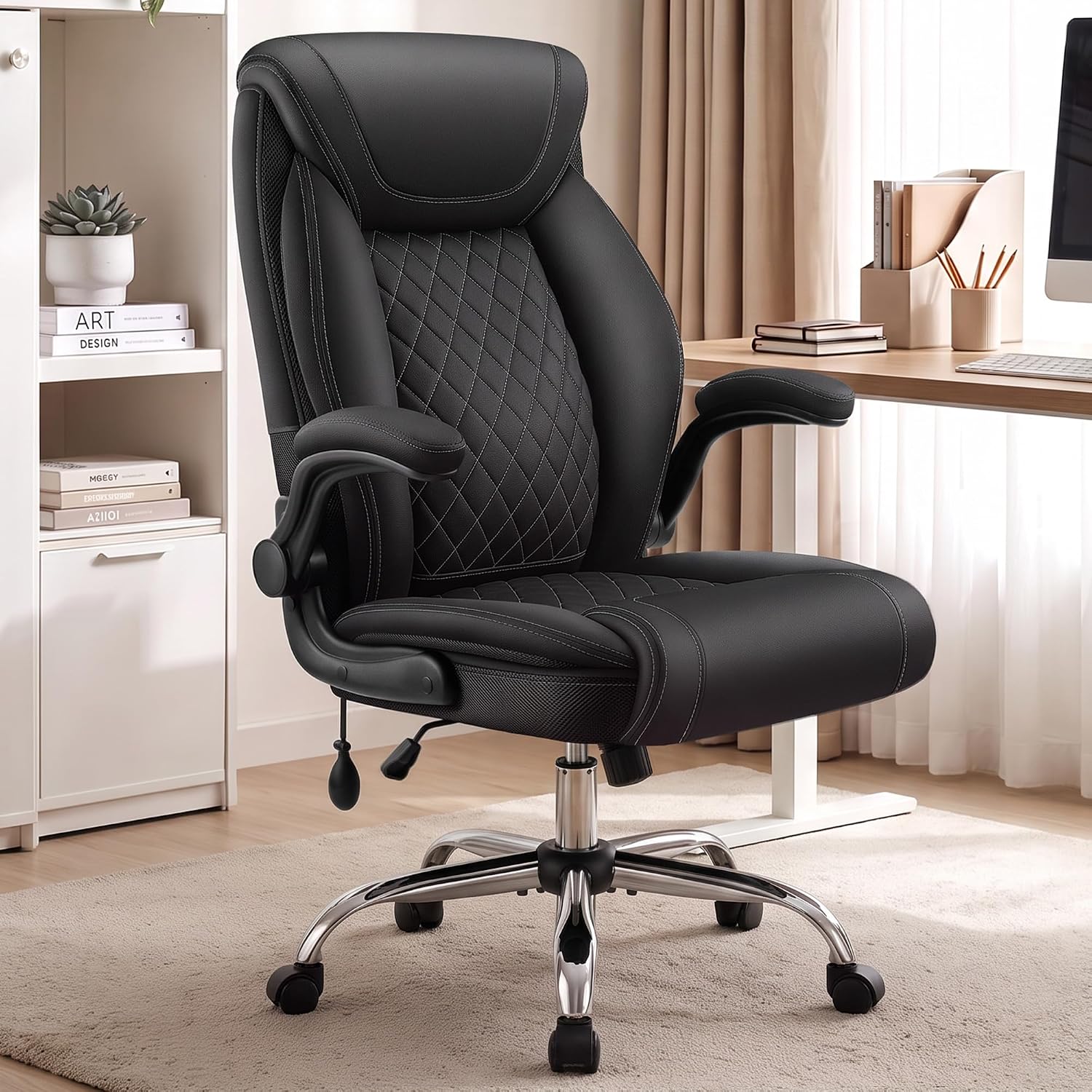
Our pick: Office Chair, Executive Leather Desk Chair with Lumbar Support
 Visit on Amazon →
This is the shape I want most people sitting in for a full workday: an upright executive task chair with a built-in lumbar support and a leather finish. The lumbar support is the reason it is here. That single feature is the difference between a chair I can set up for you and a chair I have to apologize for.
Two things to check before you commit, because the name does not tell you and the listing photos will not either. First, whether the lumbar support adjusts in place or only slides, because a pad that slides will find its way down by mid-afternoon. Second, the seat depth relative to your thigh length, because an executive chair with a deep seat will press into the back of your knees if you are short. Both are answerable in the product questions, and both matter more than the color.
Flaws but not dealbreakers: Leather runs warmer than mesh across a nine-hour day. If you run hot or your office is south-facing in July, that is a real consideration. I still prefer leather for the way it holds its shape, and I say that as someone with a mesh chair in her own home office.
Anyone who sits upright at a desk for a living, which is most of you, should start here.
The actual setup workflow
Do these in order. Each one changes the next, so if you skip around you will be redoing work.
Step one: seat height. Stand in front of the chair, then sit and set the height so your feet are flat on the floor and your knees are level with your hips or a hair below. Not higher. A seat that is too high tilts your pelvis forward and puts the whole load on your lower back. If your chair will not go low enough, you need a footrest, not a different posture. A tape measure works, but the honest test is whether you feel pressure behind your knees. You should not.
Step two: seat depth. Sit all the way back against the backrest, then slide two or three fingers between the front edge of the seat and the back of your knee. That gap is the target. Too little and the edge digs into your hamstrings. Too much and you will slide forward all day to keep your thighs supported, which dumps your lower back. If the seat is too long and will not adjust, a lumbar roll behind your back is the standard fix, because it shortens the effective depth.
Step three: lumbar support. This is the adjustment most people never make. Find the small of your back, roughly an inch above the top of your pelvis, and put the support there. Not at your mid-back. Not at your belt. When you lean back, the support should meet your curve, not press below it. If the pad slides on a track, set it and then check it at 2 p.m. for a week. The pad that "looks" adjustable is usually a lie, and the test is whether it is still in place on a Tuesday afternoon.
Step four: armrests. Elbows bent to about 90 degrees, shoulders down and relaxed, and the armrest just kissing the underside of your forearm. If the armrests are too high, your shoulders shrug all day and you get the trapezius knots I treat every single week. If they are too low, you lean to one side and your neck pays for it. Armrests are not optional. Floating elbows are how shoulder pain starts.
Step five: tilt tension and recline. Set the tension so you can lean back with a little effort, not so loose that you fall backward and not so tight that the chair is a statue. Then unlock the recline for part of the day and lock it when you catch yourself slouching. A little movement is good for the discs. A lot of slouching is not.
Step six: match the desk, or the chair work is wasted. Your chair can be perfect and your neck will still hurt if your monitor is wrong. Top of the screen at or slightly below eye level, about an arm's length away. Keyboard at elbow height so your wrists stay neutral. If your desk is fixed height and your chair is set correctly, and your elbows are nowhere near the desk, that is a desk problem, and no chair will fix it.
Step seven: run the first-week audit. Pay attention to where you are sore, because soreness is the diagnostic. Between the shoulder blades means your armrests are wrong. Lower back by mid-afternoon means your lumbar support moved or your seat depth is off. Numb or tingling legs mean the seat edge is cutting off circulation behind your knees. Neck and jaw mean the monitor is too low or too close.
Step eight: stand up. I do not care how good your setup is. Every 30 to 45 minutes, stand for a minute or two. The best chair in the world is still a chair, and the research on prolonged sitting does not care about your lumbar curve.
When the chair will not adjust
Some chairs simply do not have the range, and you should know that before you spend a week fighting one.
If the lumbar support is a fixed pillow, add a lumbar roll. That is the fix, and it costs less than a new chair. If the seat depth is wrong and there is no slider, use a cushion behind your back rather than in front of it. If the armrests wobble, tighten what you can and stop resting your full weight on them, because a wobbling armrest trains you to lean. If the gas lift starts sinking after a year or so, that is a warranty claim, not a posture problem, and you should file it.
And if the chair has zero lumbar adjustment and a seat pan that will not move, you are not setting it up. You are tolerating it. That is the one case where I tell clients to replace rather than adjust.
Why the famous chairs are not in this guide
The Herman Miller Aeron is still the benchmark, and it has been for decades. The Steelcase Gesture is the best chair I know for people who move around a lot, because the armrests follow you in a way almost nobody else's do. The Haworth Zody is the best value in the category that nobody talks about, and its lumbar actually adjusts rather than sliding.
None of them are in this guide because this guide is about the 20 minutes after the chair arrives. A flagship chair set up badly will hurt you just as reliably as an entry chair set up badly. Fit beats badge, every time.
What this all costs
I am not going to quote prices, because they move and because the math that matters is not the sticker. Divide what you pay by the number of workdays you will sit in the chair, and you get a cost per day. Do that over five years, which is the realistic life of a chair worth owning, and almost every decent chair looks cheap.
Then do the other math, the one nobody does. A chair that dies in 18 months was never a bargain, no matter what it cost on the day you bought it. A cheap gas lift, sagging mesh, or a lumbar pad that gave up are not savings. They are a second purchase you did not plan for, plus a few months of the ache that sent you shopping in the first place.
The setup itself is free. Twenty minutes, five adjustments, one week of paying attention. Do it once, write down where each adjustment ended up, and you have a chair that fits your body instead of the brochure model.