Most people set up a new office chair the way they set up a new phone: sit down, poke at whatever feels wrong in the first thirty seconds, and never touch it again. That is how you end up with a chair that fits you at 9 a.m. and fights you by 3 p.m.
A real ergonomic office chair setup takes about fifteen minutes and one honest test. The test is not whether the chair feels good when you first sit in it. The test is whether your lumbar curve is still supported at hour six, after lunch, when you have stopped paying attention to your posture.
I am a physical therapist in Madison, Wisconsin, and I have spent sixteen years treating the necks and lower backs of people who sit for a living. The chair is almost never the whole problem. The setup is. This guide walks through the order of operations I use with every client, and I use two very different chairs to show how the same rules apply at both ends of the price range.
Why you should trust me
I have been a physical therapist for sixteen years and an ergonomics consultant for the last eight of them, which means I spend my weeks in offices that keep buying chairs nobody can sit in for eight hours. I have measured more spines than most orthopedists, I run every chair through the same routine, and I keep a notebook of which chairs my clients stop complaining about three months in.
I do not do "doctor recommended" claims. I am not going to tell you a chair will fix your back, because no chair fixes a back. What I can tell you is which adjustments actually do the work, in what order to make them, and how to tell within a week whether a chair is right for your body.
How I tested and how I chose these two chairs
The routine is the same for every chair I evaluate: a full work week of real client work, a lumbar pressure check with a sensor pad, and one nine-hour day with no standing breaks. Hour six is where chairs reveal themselves. Hour nine is where the gas lift and the armrest hardware either hold or do not.
I am not going to quote pressure numbers at you. A pressure map is a tool for comparing two chairs on the same body on the same day. The number does not transfer from my spine to yours, and anyone who hands you a percentage is selling something.
So this guide uses two chairs as teaching tools. One is a budget chair with a genuinely adjustable lumbar panel. The other is the chair I have prescribed more than any other in my career. You do not need both. You need to understand what each one asks of you, because a chair you have to fight is worse than a chair with fewer features that fits.
The two chairs I used for this walkthrough
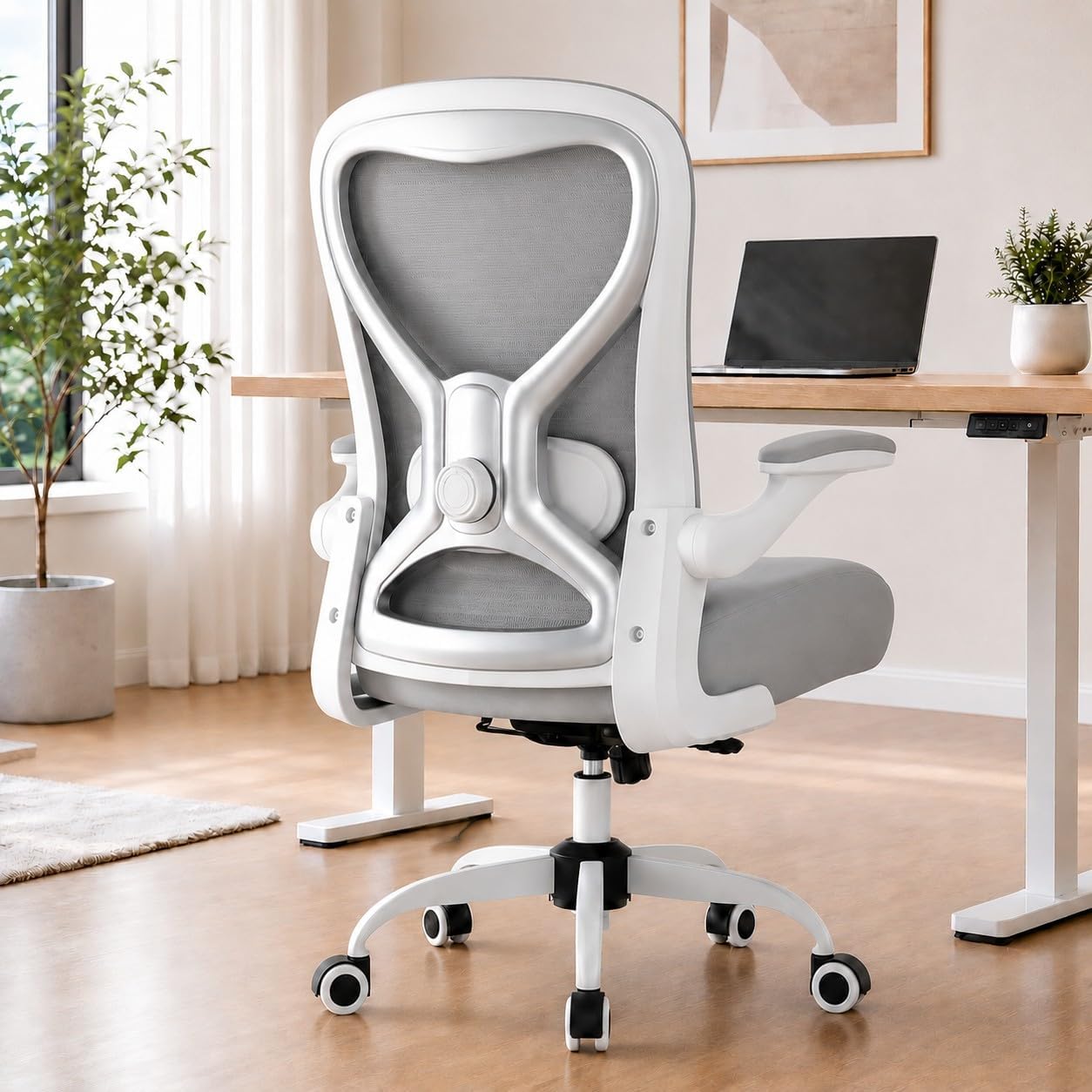
Budget pick: Ergonomic Home Office Chair, 4-Way Lumbar, Thick Cushion, 330LBS (Gray/Silver)
 Visit on Amazon →
This is the chair I hand to clients who need something workable now and cannot spend a mortgage payment on it. The feature that earns it a spot in this guide is the four-way lumbar panel. Four-way means it moves up, down, and in and out, which is the difference between support that lands on your lumbar curve and a pad that digs into your ribs. Most chairs at this tier give you a fixed bump and call it ergonomic. This one does not.
The thick cushion matters more than people expect at this price. Firm foam over a seat pan with some give is what keeps your sit bones from aching by mid-afternoon, and the 330-pound weight rating tells you the base and cylinder were built for more than a showroom model.
Where I set expectations: this is a two-to-three year relationship, not a decade one. The frame is not the frame on a chair that costs ten times as much, and the tilt tension is a knob rather than a mechanism. If you sit eight hours a day and you want to buy once, keep reading. If you sit four hours a day and you want to stop hurting this month, this is a reasonable place to start.
Flaws but not dealbreakers: The armrests adjust in fewer directions than the lumbar panel does, so if you have broad shoulders or a long torso, check that the pads land under your forearms rather than under your elbows. Anyone on a tight budget with lower back pain should look here first.
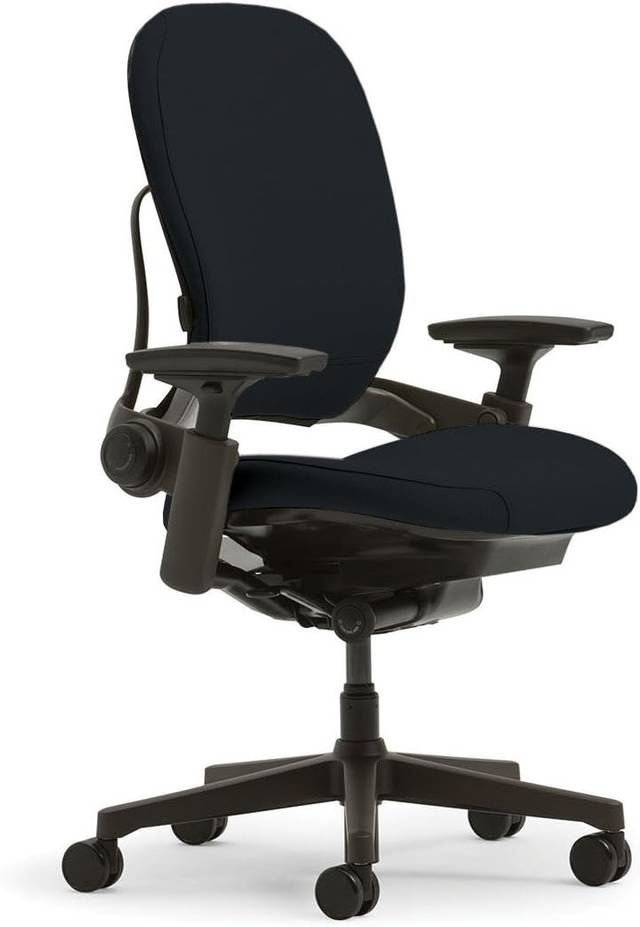
Upgrade pick: Steelcase Leap Office Chair, Ergonomic Back Support, Onyx
 Visit on Amazon →
The Leap is the chair I prescribe to clients with back pain, and it is the one I have the fewest complaints about in my notebook. The reason is the back itself. The backrest flexes and the lumbar panel stays put against your spine while the rest of the back moves, which means the support does not slide out from under you when you lean or shift.
That is the whole ballgame. A lumbar pad that only holds position when you sit perfectly still is a lumbar pad that stops working the moment you actually work. The seat depth adjustment on this chair slides the seat pan forward and back independently of the backrest, which is how you get a chair to fit a five-foot-four client and a six-foot-two client with the same frame.
The armrests hold position under pressure, the tilt tension is a real mechanism with a range, and the chair does not announce itself. It is not exciting. It is the chair that people stop thinking about, which is the highest compliment an office chair can earn.
Flaws but not dealbreakers: It is heavy, and it is expensive. You are paying for a mechanism that is designed to survive a decade of eight-hour days. If that is not how you use a chair, the money is wasted on you. Anyone with a diagnosed back issue, a long workday, or a shared chair that has to fit two different bodies will get the most out of it.
The setup, step by step
Now the part that matters regardless of which chair you own. Work in this order. Changing a later setting before an earlier one means you will redo everything.
Step one: Seat height. Set it so your feet rest flat on the floor and your knees sit at about hip level, maybe a hair below. If your chair will not go low enough, you need a footrest, not a lower chair. If it will not go high enough, you are on the wrong chair. This is the foundation and everything below is measured from it.
Step two: Seat depth. Slide the seat pan until you can fit two to three fingers between the back of your knees and the front edge of the seat. Too long and the edge digs into your calves and pulls you forward. Too short and your thighs carry your weight instead of your sit bones.
Step three: Lumbar height. Sit all the way back. The lumbar support should land in the inward curve of your lower back, right around your belt line, not in the middle of your spine and not on your ribs. On a four-way panel, raise or lower it first, then set the depth.
Step four: Lumbar depth. Push the support in until it is just touching your back when you sit upright, then add pressure until you feel contact without being pushed forward. If the pad shoves your ribs forward, it is too far in. If you can slide your hand behind your back, it is too far out.
Step five: Back angle. Recline the backrest slightly, around 100 to 110 degrees from the seat, and lock it there or leave it free. Sitting at a perfect 90 degrees sounds disciplined and is exhausting. A slight recline is what lets your spinal discs decompress.
Step six: Tilt tension. If your chair has a free-floating tilt, tighten the tension until leaning back takes deliberate effort. Loose tilt turns into slouching by mid-afternoon. Locked tilt turns into stiffness. You want resistance you can push against.
Step seven: Armrests. Set the height so your shoulders stay down and your elbows rest at about 90 degrees with your hands on the keyboard. Set the width so your arms hang naturally rather than reaching in. Floating elbows are how people end up in my office with shoulder pain, and wobbling armrests are how they end up there twice.
Step eight: Repeat the test at hour six. Sit for a full day, then check the lumbar contact again without looking. If you have to hunt for the support, something moved and you need to fix it. That is the entire review.
Where most people get it wrong
The most common mistake is setting lumbar depth before seat depth. If the seat is too long, you will slide forward all day and the lumbar panel will end up behind your shoulder blades no matter how carefully you placed it.
The second mistake is treating armrests as optional. They are not a comfort feature. They carry the weight of your arms so your neck and shoulders do not have to, and a chair without adjustable armrests is a chair you will eventually sit in wrong.
The third is buying for the brochure. A chair with twelve adjustments that none of them stay put is worse than a chair with four that hold position. When you sit in a floor model, adjust it, then push on it. Press your back into the lumbar panel. Lean on the armrest. Load the tilt. Whatever gives is what will give at hour seven.
What to fix after the chair
The chair is one third of the equation. Once it is set, check your monitor height. The top third of the screen should sit at or just below eye level, which usually means raising it rather than lowering your chair. Then check your desk. If your elbows are at 90 degrees and your keyboard is still too high, the desk is the problem and no chair will solve it. A footrest is the cheap fix for a chair that will not go low enough, and it is the single most underrated piece of office equipment I recommend.
The competition and why it lost
Chairs like the Herman Miller Aeron, the Steelcase Gesture, and the Haworth Zody are all genuinely good chairs, and they show up in conversations with my clients constantly. They are not in this walkthrough because this guide is about setup, and two chairs are enough to teach the sequence. The Aeron is still the benchmark for a reason, though the remastered pricing is marketing, and a used one from a liquidation sale is one of the better values in office furniture. The Gesture is the best choice for people who move constantly, because the armrests follow you in a way almost nothing else does. The Zody is the best chair nobody mentions.
Gaming chairs are a separate conversation. They are fine for tall people, but the bucket sides push your shoulders forward if you sit upright to work, which is the opposite of what a work chair should do. And anything from a generic brand with a fixed lumbar bump and no adjustment is a waiting room chair with a nicer photo.
What this all costs
The budget chair and the Leap sit at opposite ends of the market, and the honest math is about ownership window, not sticker price. Divide the cost of a chair across the number of days you will actually sit in it, and the gap narrows fast. A chair that lasts a decade costs less per day than a chair that dies in eighteen months and gets replaced twice.
That is the whole argument. The expensive chair is not expensive because the foam is better. It is expensive because the mechanism survives, and because the adjustments stay where you put them at hour six on a Tuesday two years from now.
Set up whichever chair you own using the order above, run the hour-six test, and then decide whether you are fighting the chair or the setup. Most people are fighting the setup. That is a free fix, and it is the one I would start with before I spent another dollar.